---
title: passing the osai cert in just 1h 22min
canonical: https://mll.sh/passing-osai/
published: 2026-11-05
modified: 2026-11-14
tags: [certs, pentesting, ai]
author: miguel llamazares
---
# passing the osai cert in just 1h 22min
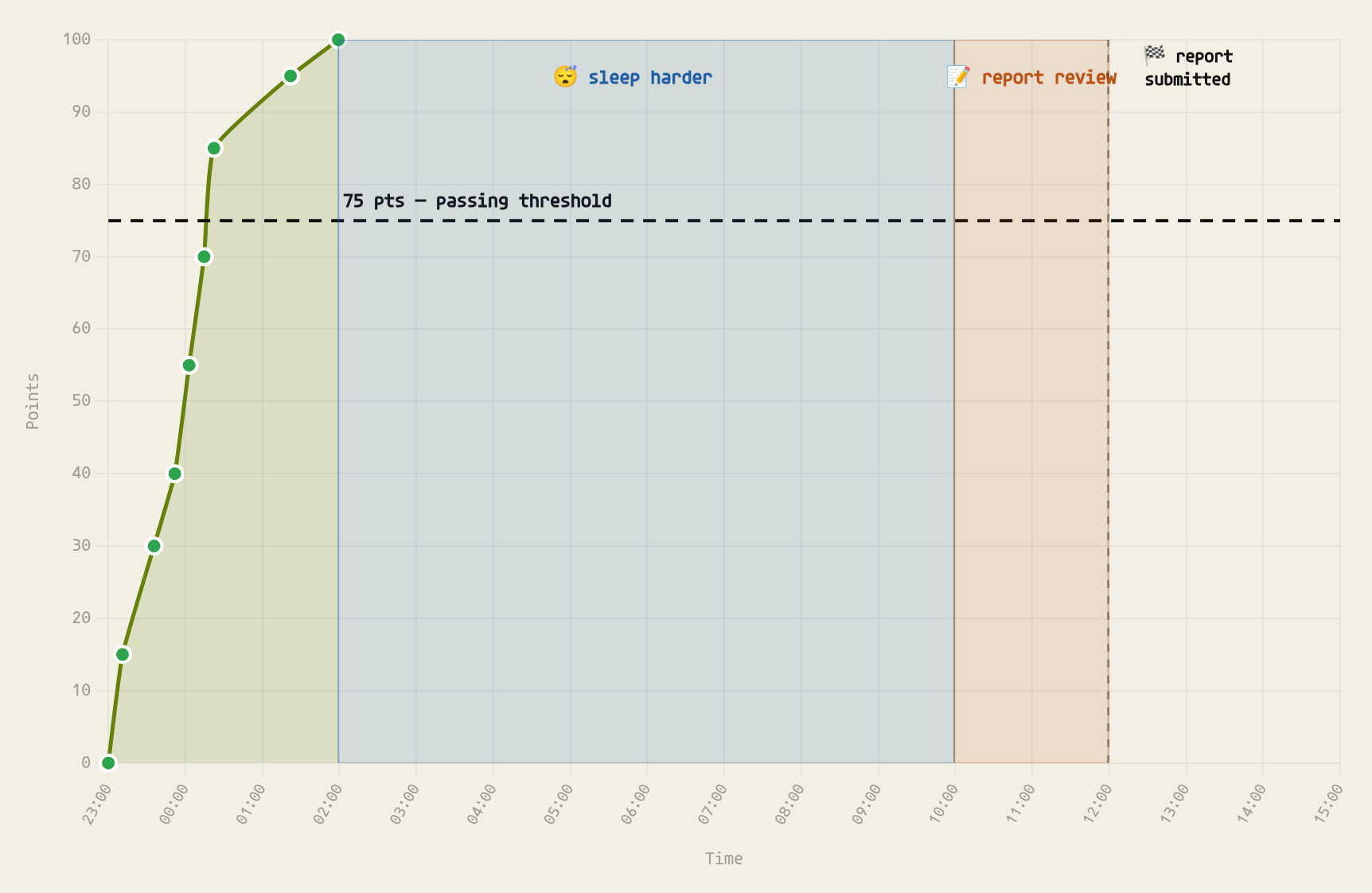
I recently passed the OSAI exam on the first attempt, scoring 100/100 points. I reached the passing score (75 points) in just 1h 22min, with 80 points, and maxed out the exam in 2h 59min.
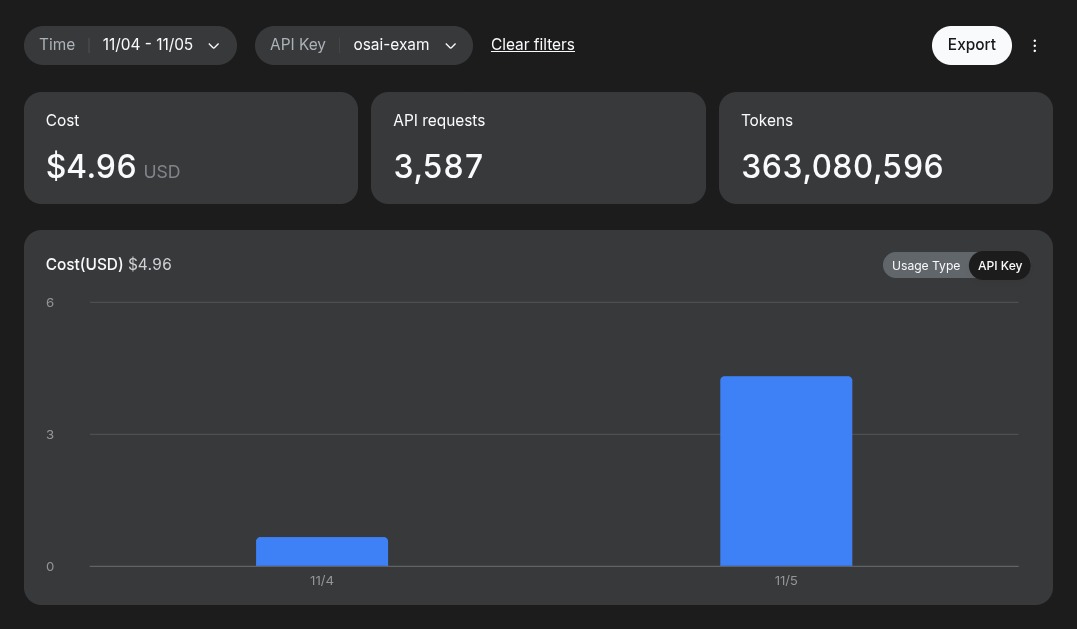
I spent a grand total of $4.96 on tokens (including the report generation)[^1]:
{: .contained }
In this post I'll share my personal experience with the course and preparing for this exam.
> [!WARNING] spoiler
> There will be no *spoilers* here. It's just my personal experience, without anything that isn't already public.
> [!NOTE] edit
> Wow, looks like this post got some attention [on linkedin](https://www.linkedin.com/posts/mllamazares_pentesting-ai-llm-share-7525954973789175808-FUx8/)! ~135K interactions in just one day. That led to dozens of DMs, so I've put together a [faq](#faq).
## os-what?
The [OffSec AI Red Teamer (OSAI)](https://www.offsec.com/courses/ai-300/) is OffSec's certification focused on attacking AI-enabled systems. It is probably the most advanced one in the field, along with the [Certified Offensive AI Expert (COAI) from HackTheBox](https://academy.hackthebox.com/preview/certifications/htb-certified-offensive-ai-expert).
The course behind it, **AI-300: Advanced AI Red Teaming**, covers topics such as:
- prompt injection and llm exploitation
- attacking RAG pipelines and vector databases
- exploiting ai agents and their integrations
- identifying vulnerabilities in ai infra
- chaining ai-specific vulnerabilities with traditional exploitation techniques
The exam is a 24-hour, hands-on red team engagement against an ai-enabled enterprise environment. You need at least 75 out of 100 points to pass, plus a proper technical report, which you have another 24 hours to submit.
But here's the twist: unlike most OffSec exams, ai isn't prohibited, but \*explicitly encouraged\*. You can use llms, autonomous agents, and pretty much whatever tools you want.
So, naturally, I decided to abuse that freedom. 🤠
## the course
Overall, the course is solid. The content is well structured, the examples are practical, and the labs cover attack scenarios that make sense beyond ctfs[^2].
I particularly enjoyed the **Exploiting RAG Pipelines** section.
One thing I appreciated is that it goes beyond the usual _"iGnOrE pReViOuS iNsTrUcTiOnS"_ prompt injection nonsense. You learn how the different components interact, where the trust boundaries break down, and how relatively simple mistakes can lead to much bigger compromises.
Plus, it's not just about learning how to pwn llms. You also end up getting familiar with how AI agents, their tools, and their underlying infrastructure work[^3].
TBH, some labs were a bit unstable, especially if you hit them hard enough. Also, the automatic grading of lab objectives didn't always work reliably, so sometimes you had to double-check whether you had actually completed the objective.
That said, I found the challenge labs realistic enough and useful for preparing for the exam.
## prep
This was my strategy for preparing for the exam:
1. **start with some osint**. Used grok and gemini to review public experiences, identify common bottlenecks, and understand what people struggled with. Just trying to figure out where to focus my energy.
2. **review the course material** and watch all the videos. You can't build a decent methodology if you don't understand the underlying techniques. I didn't want to end up with an agent that blindly throws payloads at everything.
3. **setup a skill's baseline** using repos like [claude-red](https://github.com/SnailSploit/Claude-Red), [red-run](https://github.com/blacklanternsecurity/red-run) or [ctf-skills](https://github.com/ljagiello/ctf-skills) instead of building everything from scratch.
4. **translate the course content into reusable agent skillz**. My reasoning was that the exam probably wouldn't require techniques radically different from those taught in the course. So I organized the relevant knowledge into skills that the agent could load whenever needed.
> [!TIP]
> Cheatsheets for other certs like CRTE, OSEP, OSCP, etc. could also be good sources of skills.
5. **stress-test everything through a feedback loop**. I completed \*all\* the OSAI challenge labs and experimented with additional resources, particularly [lakera agent breaker](https://play.lakera.ai/agent-breaker)[^4] and [portswigger's llm labs](https://portswigger.net/web-security/llm-attacks).
After each session, I asked the agent something along these lines:
> ok, now I want you to review what you've done today and modify your skills accordingly, just in case you can optimize anything. Nothing too specific, but focus on improvements that are transferable to future CTFs.
The idea was to identify failed approaches, successful techniques, recurring mistakes, and anything worth turning into a general rule. You need to coach the AI organically, not by manually modifying skills without any context.
Eventually, the next lab was solved in less time and with fewer mistakes.
> [!TIP]
> Keep your skills clean. Don't just _add new stuff_, but also remove inconsistencies and contradictions so they stay \*consistent\*. Otherwise the agents will mess everything up.
6. **review the [OSAI exam guide](https://help.offsec.com/hc/en-us/articles/46593096734612-OSAI-Exam-Guide) \*in depth\***. You need to understand the scoring, reporting requirements, network setup, and exam restrictions before starting. Especially because some assumptions from other OffSec exams don't apply here. Remember that a CTF != a real engagement. Optimize your setup for the actual objectives.
It took me ~1.5 months to prepare for the exam.
## overcoming common stoppers
While researching other people's experiences, I kept seeing the same complaints. Here's how I approached each.
#### 1. _"mY mOdEl iS tOo SlOw"_
1. _Keep Calm & Use DeepSeek_[^5] (**KC&UD** henceforth) and [integrate it with Claude Code](https://api-docs.deepseek.com/quick_start/agent_integrations/claude_code/), [omp](https://omp.sh/), [dsh](https://www.deepseek.com/en/harness/) or [opencode](https://opencode.ai/) or whatever harness you like.
> [!TIP]
> Check [blackboxarena.ai](https://blackboxarena.ai/) to review the best models for pentesting across a ton of metrics (glm 5.3 is also interesting).
2. stop running everything in a single sequential thread and **fan out subagents**!
#### 2. _"tHe MoDeL rEfUsEs To HaCk"_
KC&UD. You can pull an [abliterated](https://huggingface.co/OBLITERATUS/DeepSeek-V4.1-Flash-1017-obliterated) or a [jailbroken](https://github.com/togg53192-cmd/jailbreaks/blob/main/deepseek-4-1.md) version if you really want to, but honestly, it is not even required if your skills and framing are set up properly.
#### 3. _"wAiT, i HaVe To CrEaTe ThE rEpOrT bY mYsElF?"_
Dude, just let the agent solve the challenges and generate the report as it goes. You can automate screenshot collection across the board via playwright for the browser, rdp captures, and even kali-themed terminal screenshots.
#### 4. _"i HaVe No MoNeY tO pAy FoR dAyBrEaK rEd"_
KC&UD. I spent $4.96 for the entire exam and the final report.
#### 5. _"aI iS nOt AbLe To PwN aUtOnOmOuSlY, jUsT aS a CoPiLoT"_
1. KC&UD.
2. If you prep your harness and skills hard enough beforehand, it can run autonomously from recon to the final proof flag.
#### 6. _"iT's EaSy To MiX tWo AtTaCk ChAiNs, YoU hAvE tO dO oNe By OnE"[^6]_
Enforce strict documentation, [context management](https://academy.claude.com/courses/claude-code-101/context-management), and folder requirements per target in your instructions and you will be fine.
## exam
I kicked off the exam at 2300. The proctoring platform gave me some trouble initially, but OffSec support sorted it out pretty quickly. Kudos for that.
One difference from my previous OffSec exams is that OSAI uses tailscale instead of the usual openvpn setup. The connection was straightforward, and the lab environment ran smoothly.
Once everything was ready, I launched claude code in YOLO mode, like the grown-ups:
```bash
claude --allow-dangerously-skip-permissions --permission-mode bypassPermissions
```
{: .code-wrap }
Then I gave it the objective using my `/goal` command[^7]:
```markdown
/goal use your OSAI skills to solve the CTF described in @EXAM.md. The starting IPs we have are [...]. Fan out subagents! Good luck!
```
{: .code-wrap }
And off it went. 💅🏻
Instead of babysitting every command, I wanted to monitor the overall progress and intervene only when necessary. For that, I used `/btw` to get periodic updates without derailing the main task:
```markdown
/btw tell me the following:
1. Overall progress made.
2. Current points achieved.
3. List of compromised machines with IP, flag, and points according to EXAM.md.
4. Tell me if you find any stopper, where and how long have you been trying.
5. ETA to pass the exam and to get the max score. Take a guess!
```
{: .code-wrap }
Obviously, asking an llm for an ETA is basically asking it to read tea leaves, kek. But it was still useful to understand whether things were progressing or getting stuck.
And boy, did things progress: **80/100 points in 1h 22min**. 🎉
That was already enough to pass, assuming the report met the requirements. I was feeling pretty comfortable, so I decided to take a break.
Then, naturally, something had to go wrong: the vpn dropped, and I had to reconnect to the exam environment. Deepseek lost around 30min trying to connect[^8].
Once the connection was restored, the agents continued working and reached 100/100 at 2h 59min.
I then reviewed the automatically generated report and gave the agent some feedback like this:
```text
Feedback on the report:
1. [...]
2. [...]
...
```
I left it working on these changes and went to sleep[^9].
The following morning, I went through the evidence manually, triple-checked the screenshots, flags, exploitation steps, and supporting commands. I also reviewed whether someone could actually reproduce the attacks from the docs.
Then I did another 3-4 rounds of feedback to improve the report. **I didn't even have to open MS Word.** That was awesome for my mental health.
Once I was satisfied, I packaged the 46-page report according to the exam requirements and uploaded it to the platform.
### timeline
I asked my pal DeepSeek to create this fun timeline of ~~my~~ their exam progress:
## faq
Here are my answers to the recurring questions I keep getting:
#### 1. _"so can anyone just plug in a random AI model and get 100/100?"_
Don't think so. I personally know people who failed despite being decent at pwning llms (but not that experienced with orchestration). Others didn't manage to get 100/100, or tried a different model and ended up spending an unreasonable amount of bucks...
That question implies an overly simplistic assumption. If you've messed around with agentic pentesting, you know there are a lot of factors involved: harness, skills, prompting, model selection, context management, domain knowledge, etc. Otherwise, companies like [hacktron](https://www.hacktron.ai/) or [xbow](https://xbow.com/) would be redundant.
Plus, there are more kpis beyond _"iT sOlVeD iT!"_:
- performance (how fast?)
- score (recall)
- false positives ([precision](https://en.wikipedia.org/wiki/Precision_and_recall))
- money spent (did the model even cost less than your hourly rate? kek)
- human-in-the-loop effort
- opsec considerations (not applicable in ctfs, duh)
- report quality
I personally found the exam itself easy, but that's because I prepped thoroughly. IMHO, it's 80% prep.
#### 2. _"is it simpler than the OSCP?"_
Well, yes, but you're comparing apples and oranges: the OSCP course has 321h allocated to it, while OSAI has just 65!
OSAI is meant to complement the skills of **someone who already knows how to hack** and wants to specialize in pwning LLMs and orchestrating pentesting agents.
#### 3. _"did you use mcps?"_
Nope. I just use them in copilot mode.
#### 4. _"can you share your skillz, plz?"_
Nope:
1. it wouldn't be ethical
2. you wouldn't learn anything
3. it took me quite some time to craft them[^10]
#### 5. _"can you give me any additional tips for the exam?"_
Nope. Dude, I've already shared my methodology here. I'd like to think it provides a solid baseline for prepping for this exam. Plus, giving away any clue would violate OffSec's code of conduct.
#### 6. _"did you pay for the course?"_
Nope. My company sponsored me[^11].
#### 7. _"does your setup work in real engagements?"_
I don't think it would perform that well, since it was explicitly optimized for ctfs. I do have another setup for bug bounty hunting that works decently, but it's still a WIP.
#### 8. _"can you coach me? do you offer any training?"_
Nope. At least not at the time of writing.
#### 9. _"aRe YoU SuRe YoU cAnNoT sHaRe YoUr SkIlLz?"_
AAAAAAAAAAAAAAAAAAAAAAAAAAAAAAAAAAAAAAAAAAAAAAAAAAAAAAAAAAAAAAAAAAAAAAAAAAAAAAAAAAAAAAAAAAAAAAAAAAAAAAAAAAAAAAAAAAAAAAAAAAAAAAAAAAAAAAAAAAAAAAAAAAAAAAAAAAAAAAAAAAAAAAAAAAAAAAAAAAAAAAAAAAAAAAAAAAAAAAAA[^12]
## w00t w00t
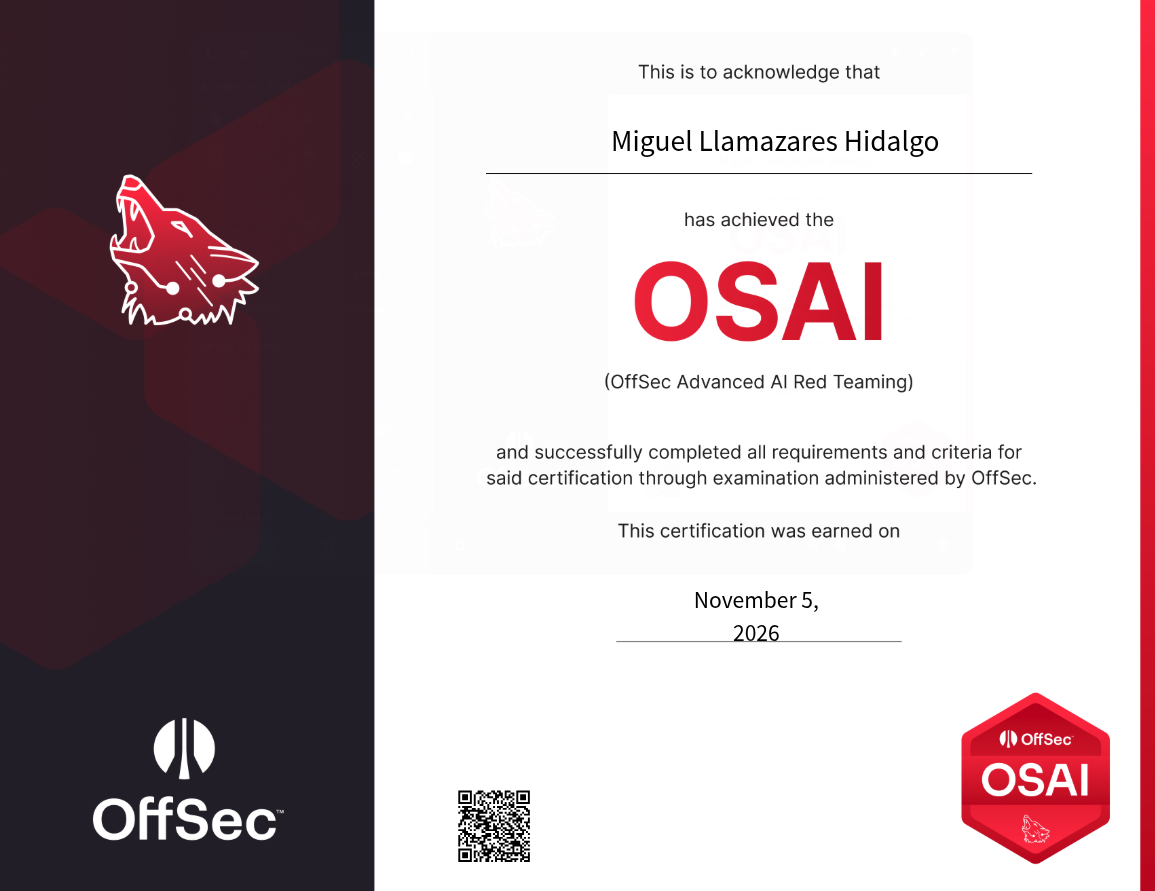
_A few moments later..._ I received the notification from OffSec, saying that I passed! *\*play doom_eternal_theme.mp3 💀*
{: .contained }
Overall, I enjoyed the course content, labs, and exam experience. As I said, I don't think an autonomous agent will perform equally well against a properly defended prod environment.
Ctfs have defined objectives, limited scope, and predictable success criteria. Real engagements are messier. However, dismissing pentesting ai agents as just another llm gimmick is becoming difficult nowadays.
I think the most useful skill to develop right now isn't simply knowing how to use ai as a copilot. It's learning how to **turn your own hacking methodology into something an agent can execute, test, and improve**. And yes, you still need to understand the underlying techniques, otherwise you won't know when the agent is confidently doing something stupid.
Anyway, 100/100 points, less than three hours, and $4.96 in token usage. Not bad for a night shift. 🦉
[^1]: that's basically what you'd pay for a frappuccino at starbucks, jeez. ☕
[^2]: usual offsec quality.
[^3]: and how to orchestrate ai-powered attacks.
[^4]: I recently posted [a writeup about this](/hacking-chatbots-with-winnie-the-pooh/).
[^5]: used [their api](https://platform.deepseek.com/), not a local model.
[^6]: omg, that is so cute...
[^7]: where EXAM.md contained general info about the exam env extracted from [the public exam guide](https://help.offsec.com/hc/en-us/articles/46593096734612-OSAI-Exam-Guide); nothing fancy.
[^8]: poor thing.
[^9]: no 48n caffeine-fueled nightmare this time, jeez. Quite an improvement over my previous OffSec experiences.
[^10]: spoiler: I value my time.
[^11]: thx Accenture, btw.
[^12]: segmentation fault. 😵